Transform Photos into Art with This Photoshop Action
Imagine turning a standard portrait or a scenic landscape into a piece of art that looks like it was painstakingly drawn by hand. That’s the magic a dedicated Color Pencil Sketch Photoshop Action brings to your digital toolkit. This isn't a simple filter that slaps a texture over your image; it's a sophisticated set of instructions designed to analyze your photo and reconstruct it with the delicate lines, soft shading, and vibrant color blending characteristic of a real colored pencil sketch. The result is an image with personality and depth, perfect for creating unique visuals that stand out in a crowded digital space.
The Visual Character: More Than Just a Filter
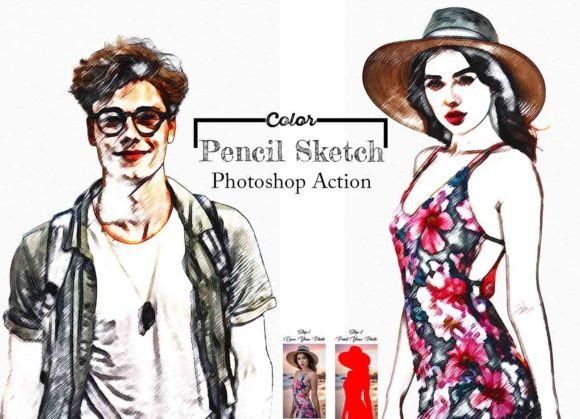
The core appeal of this Color Pencil Sketch Photoshop Action lies in its nuanced output. It doesn't just desaturate and outline; it interprets tonal values and translates them into layered pencil strokes. You'll notice the subtle grain of paper texture coming through, the way highlights appear as untouched canvas, and how shadows are built up with multiple layers of hatching and cross-hatching. The color palette is both vibrant and natural, mimicking the way colored pencils blend on paper—achieving rich hues without looking digitally saturated. This gives the final image a handcrafted, authentic feel that resonates with audiences seeking more genuine and artistic content. It’s a style that carries a sense of nostalgia, creativity, and personal touch.
Practical Applications Across Creative Fields
This action is a versatile design asset with applications far beyond personal photo enhancement. For brand identity and logo design, it can generate unique brand marks or illustrative elements that convey creativity and approachability. A boutique bakery, an artisanal craft shop, or a children's book author could use this style to build a cohesive and memorable visual language.
In editorial design and packaging design, a pencil sketch aesthetic adds instant character. Imagine a cookbook with recipe illustrations rendered in this style, or product packaging for organic goods that uses sketch-based imagery to emphasize natural ingredients. For web design and social media graphics, these stylized images stop the scroll. They are perfect for blog headers, Instagram posts, Facebook ads, or website hero images where a standard photo might get lost. The style works exceptionally well for content related to art, design, DIY projects, education, and storytelling.
Integrating the Action into Your Workflow
Using the Color Pencil Sketch Photoshop Action is designed to be straightforward, even for those with basic Photoshop knowledge. The key is preparation. As noted in the instructions, resizing your image to a consistent dimension (like 3000px x 2000px at 72 PPI) ensures the action processes correctly and delivers high-quality results. The critical step of creating and painting on a "paint" layer gives you precise control over the subject of the sketch, allowing you to isolate a person, an object, or a specific area for the effect.
This level of control is what separates a professional tool from a basic filter. You’re not just applying an effect; you’re directing it. The included ATN file, help documents, and video guide provide a clear path to success. Because it works across a wide range of Photoshop versions from CS6 to CC2022, it’s accessible to a large user base. The organized layers within the action’s output also make it easy to tweak individual elements—adjusting the intensity of the pencil lines, modifying color balance, or blending the sketch layer with the original photo for a subtler effect.
Making the Most of Your Artistic Asset
To truly leverage this creative font equivalent in the image world, think about context and pairing. A pencil sketch style pairs beautifully with clean, modern sans serif fonts for a balanced contrast between handcrafted and digital. It can also complement serif fonts with a classic, editorial feel. When using it for marketing materials, ensure the style aligns with your brand's voice—ideal for brands that value authenticity, craftsmanship, and creativity.
Always test the output on your specific project. Create a mockup of a social media post, a website banner, or a product label to see how the sketch integrates with your other design elements. Pay attention to readability; while the style is artistic, any overlaid text must remain clear and legible. The action's ability to produce a high-quality result with organized layers means you can fine-tune these details. It’s an investment in a premium font-style asset that can elevate multiple projects, saving you time while adding significant visual value. Ultimately, this tool empowers you to give any image a distinctive artistic voice, making your work more engaging and memorable.