RGB Color: An Editable Text Effect for Dynamic Designs
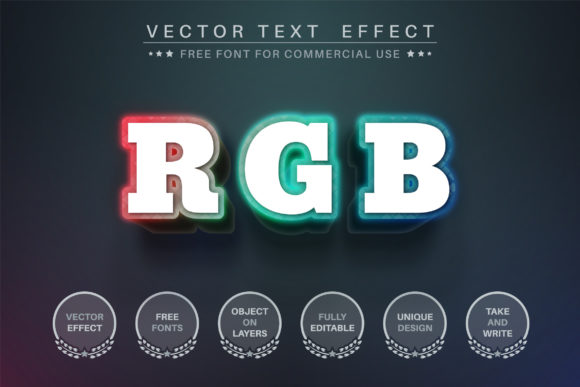
There’s a particular kind of visual energy that comes from color separation—the slight offset of red, green, and blue channels that creates a sense of movement and depth. This is the core personality of the RGB Color - Editable Text Effect. It’s not just a static overlay; it’s a tool designed to give your typography a vibrant, digital-native pulse. If you’ve ever wanted to add a glitch-inspired, chromatic, or retro-futuristic vibe to a headline without spending hours manually layering and offsetting paths, this effect is built for that exact purpose. It captures the essence of screen-based color mixing, translating it into a tangible, editable vector asset.
Visual Character and Immediate Appeal
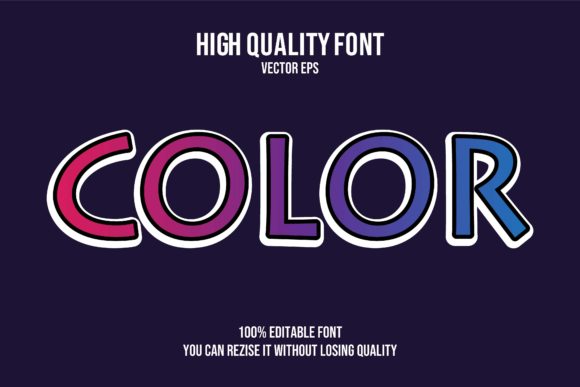
At its heart, the RGB Color - Editable Text Effect is a display font treatment that mimics the look of misaligned color channels. Imagine typing a word and seeing it instantly rendered with a subtle 3D pop, where each letter appears to be composed of separate red, green, and blue layers slightly offset from one another. The result is eye-catching, modern, and full of personality. It feels technical yet playful, nostalgic for early digital aesthetics but perfectly suited for contemporary web design and social media graphics. Because it’s a vector format asset, the effect is crisp and scalable—from a small icon to a massive banner—without any loss of quality.
Where This Creative Font Shines
The versatility of this editable text effect is one of its strongest points. It’s not a one-trick pony limited to a single industry. Consider its applications across the creative spectrum:
- Branding and Logo Design: For tech startups, gaming channels, music producers, or any brand aiming for an innovative, cutting-edge identity, this effect can become a cornerstone of a brand identity. It suggests a connection to technology, creativity, and forward-thinking.
- Marketing and Social Media: In the fast-scrolling world of Instagram, TikTok, or digital ads, grabbing attention is paramount. A headline set with the RGB Color effect can stop a thumb mid-scroll. It’s perfect for promoting events, product launches, or sale announcements where a burst of visual excitement is needed.
- Publishing and Editorial Design: Book covers, magazine spreads, and blog headers often need a striking typographic element. This effect can add a unique, artistic flair to chapter titles, feature article headings, or podcast artwork, setting a distinct mood before the content is even consumed.
- Packaging and Merchandise: Imagine this effect on a sticker, a t-shirt graphic, or the label of a specialty beverage. It translates beautifully to print, especially when paired with solid, clean backgrounds, making products feel more contemporary and design-forward.
- Personal and Hobby Projects: From creating custom invitations to designing a standout resume header or personalized stationery, the effect allows hobbyists and crafters to infuse professional-grade visual interest into their work effortlessly.
Making It Work: Practical Guidance for Your Projects
While the effect is designed to be easy to use, integrating any premium font or design asset effectively requires some thoughtful consideration. Here’s how to get the most out of the RGB Color - Editable Text Effect.
Evaluating Fit and Ensuring Readability
First, assess the tone of your project. This effect carries a strong stylistic voice—energetic, modern, and slightly technical. It’s fantastic for projects that want to convey innovation, creativity, or a digital edge. It might be less suitable for traditional, formal, or highly minimalist contexts where a classic serif font or neutral sans serif font would be more appropriate. Always consider your audience; a younger, digitally-savvy crowd will likely respond enthusiastically to its aesthetic.
Readability is a key consideration with any display font. The chromatic offset, while visually engaging, can reduce clarity at very small sizes or in long blocks of text. This effect is best used for headlines, logos, short phrases, and call-to-action elements—not for body copy. Test your text at the intended viewing size. If the letters begin to merge or become difficult to decipher, simplify the wording or increase the scale.
Font Pairing and Stylistic Harmony
The most effective designs often use a combination of typefaces to create hierarchy and balance. Pair the RGB Color effect with a clean, highly legible sans serif font or a simple serif font for supporting text. The contrast will allow the effect to stand out as the hero element without overwhelming the entire layout. Avoid pairing it with other highly decorative, script font, or handwritten font styles, as this can create visual chaos. Think of the effect as the main vocalist and your supporting typeface as the steady rhythm section.
Leveraging the Editable Vector Format
The true power of this asset lies in its editability. Delivered in AI and EPS formats, it’s a fully editable text effect. This means you can:
- Customize Colors: While it’s named for RGB, you are not locked into those specific hues. You can recolor the offset layers to match any brand palette—imagine using shades of cyan and magenta, or even a monochromatic scheme with varying opacities for a more subtle effect.
- Resize and Scale Freely: As a vector format file, it can be scaled to any dimension without pixelation. This makes it ideal for projects that require assets at multiple sizes, from a favicon to a billboard.
- Integrate with Other Assets: You can combine the styled text with other design assets like shapes, illustrations, or photographs within Adobe Illustrator to create complex, layered compositions.
Before diving in, take a moment to review the included manuals. The Manual_vector_text_effect.pdf and Manual_vector_effect_to_logo.pdf provide straightforward instructions on how to apply and customize the effect, ensuring you can unlock its full potential quickly. Whether you’re a seasoned designer or a small business owner managing your own visuals, this guidance helps bridge the gap between having a powerful tool and using it effectively.
In the landscape of modern typography, assets like the RGB Color - Editable Text Effect offer a shortcut to sophisticated, eye-catching results. It’s a creative font